Fwd: [heroineworshiper/hvirtual] question about clipping in Histogram plugin (Issue #8)

well, Andrea, can I copy your email to GitHub issues or you prefer to explain it there yourself? I think your use case goes a bit beyond just testing and into actual workflow category? ---------- Forwarded message --------- От: Adam Williams <notifications@github.com> Date: пт, 10 нояб. 2023 г., 21:16 Subject: Re: [heroineworshiper/hvirtual] question about clipping in Histogram plugin (Issue #8) To: heroineworshiper/hvirtual <hvirtual@noreply.github.com> Cc: Andrew Randrianasulu <randrianasulu@gmail.com>, Author < author@noreply.github.com> The big problem with histogram is histograms are expected to clamp. The graph has to be changed to show a Y range beyond 0-1, you need some more parameters to define min & max Y. You could make a new histogram plugin which implemented the new options. It gets a bit bloated so the question is again why you need histogram to support more than 0-1? Sent: Thursday, November 09, 2023 at 11:14 AM From: "Andrew Randrianasulu" ***@***.***> To: "heroineworshiper/hvirtual" ***@***.***> Cc: "Adam Williams" ***@***.***>, "Comment" ***@***.***> Subject: Re: [heroineworshiper/hvirtual] question about clipping in Histogram plugin (Issue #8) A case of is it worth the effort to support values <0 & >1 & the answer was no. If you can find a good reason & actually fix everything including the opengl functions no-one uses, maybe it could work. well, I looked into playback3d.C and some shaders there surely uses clip? But biggest problem for me I do not know how to init fp32 fbo/pbo, so it all remained clipped. But just switching textures to 32f made big difference with test file Andrea provided and fade out. https://www.youtube.com/watch?v=7GOhtJciHBk I tried to follow advice given in https://community.khronos.org/t/glx-ati-pixel-format-float-under-linux/47685... (but using more modern GLX_RGBA_FLOAT_BIT_ARB). use-case is exr/tiff from some photography software or rasterizer, where values > 1.0f exist. (ffmpeg seems to convert most/all video to integer formats, but may be in last ffmpeg they added it - https://git.ffmpeg.org/gitweb/ffmpeg.git/commit/479747645f795b6f4f376578ea15... - "avutil/pixfmt.h: add native-endian RGB32F and RGBA32F formats") — Reply to this email directly, view it on GitHub, or unsubscribe. You are receiving this because you commented.Message ID: ***@***.***> — Reply to this email directly, view it on GitHub <https://github.com/heroineworshiper/hvirtual/issues/8#issuecomment-1806198961>, or unsubscribe <https://github.com/notifications/unsubscribe-auth/AJSS7TJ5T7MREFWQWTBCADLYDZVO5AVCNFSM6AAAAAA7E3NKDOVHI2DSMVQWIX3LMV43OSLTON2WKQ3PNVWWK3TUHMYTQMBWGE4TQOJWGE> . You are receiving this because you authored the thread.Message ID: <heroineworshiper/hvirtual/issues/8/1806198961@github.com>

well, Andrea, can I copy your email to GitHub issues or you prefer to explain it there yourself? I think your use case goes a bit beyond just testing and into actual workflow category?
Yes, you can use e-mail, of course. But it seems that Adam is not interested in the problem.... By now almost all cameras suitable for video and even inexpensive camcorders use the 100-110% (super-white) range. Being able to get details from pure white is important in the video world. And I don't mean modern HDR, which goes even beyond 110%. Not to mention the VFX and 3D graphics compositing area where even one blend can lead to clipping and ruin an entire scene. Being able to bring extra range values back within range is useful and important. So Adam is wrong to think it is a useless feature. The fact is that he does not care about this aspect of his program and does not intend to waste time on it. That is fine, but it is his preference and not an objective choice. Message ID: <heroineworshiper/hvirtual/issues/8/1806198961@github.com>
Re-reading Adam's last reply, it seems to me that he is confusing Waveform with Histogram, since he is talking about the Y-axis while in the histogram you should be talking about the X-axis.
And again: Adam says Histogram has to do the clipping. Perhaps he means that in broadcast they only accept video limited to 0-1.0. But here again he is wrong. The floating point is used to bring the out-of-range data back within the legal values and thus get a higher quality result (without burned out whites and with much more detail). The example of the image with the window is typical: being able to show the panorama there where a limited range only shows overexposure. When you clip that project for rendering, it will continue to contain the view from the window, because that data has become legal.
пт, 10 нояб. 2023 г., 22:01 Andrea paz <gamberucci.andrea@gmail.com>:
And again: Adam says Histogram has to do the clipping. Perhaps he means that in broadcast they only accept video limited to 0-1.0. But here again he is wrong. The floating point is used to bring the out-of-range data back within the legal values and thus get a higher quality result (without burned out whites and with much more detail). The example of the image with the window is typical: being able to show the panorama there where a limited range only shows overexposure. When you clip that project for rendering, it will continue to contain the view from the window, because that data has become legal.
I tried to update issues with slightly compressed "supecut" of this :)
пт, 10 нояб. 2023 г., 22:18 Andrew Randrianasulu <randrianasulu@gmail.com>:
пт, 10 нояб. 2023 г., 22:01 Andrea paz <gamberucci.andrea@gmail.com>:
And again: Adam says Histogram has to do the clipping. Perhaps he means that in broadcast they only accept video limited to 0-1.0. But here again he is wrong. The floating point is used to bring the out-of-range data back within the legal values and thus get a higher quality result (without burned out whites and with much more detail). The example of the image with the window is typical: being able to show the panorama there where a limited range only shows overexposure. When you clip that project for rendering, it will continue to contain the view from the window, because that data has become legal.
I tried to update issues with slightly compressed "supecut" of this :)
updated issue with two more links I have found. Sadly, it seems that Blender / Natron histograms are a bit sparse on what exactly they show ....
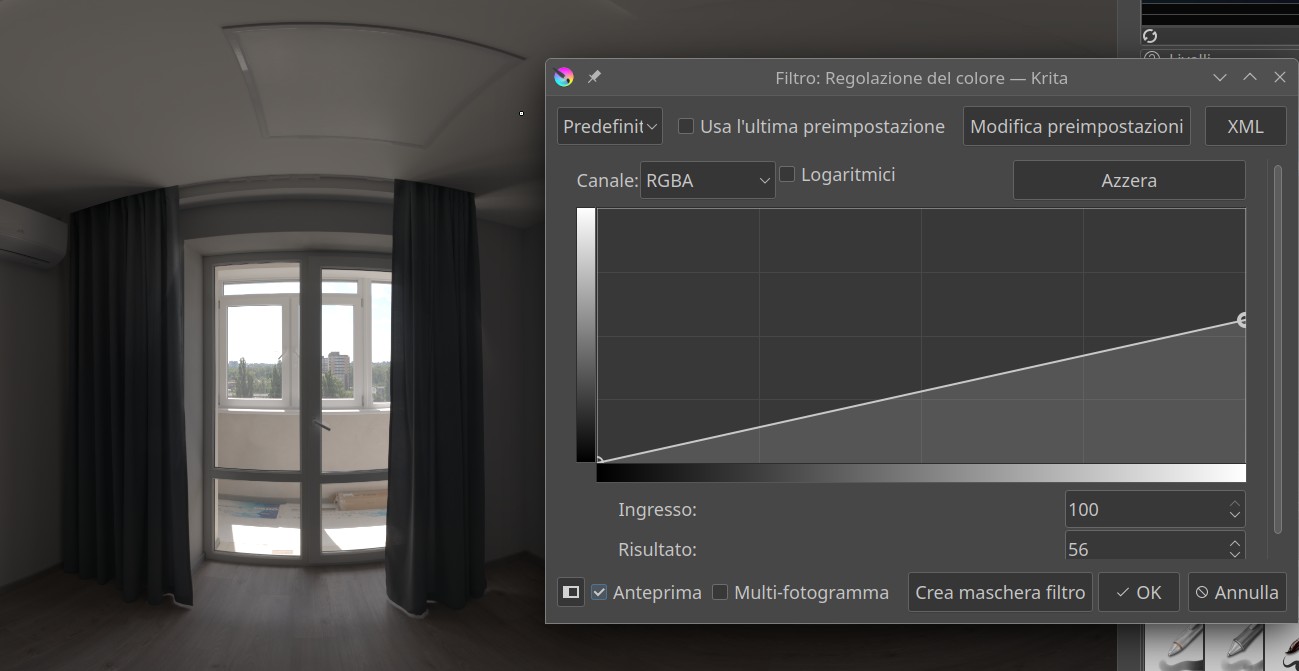
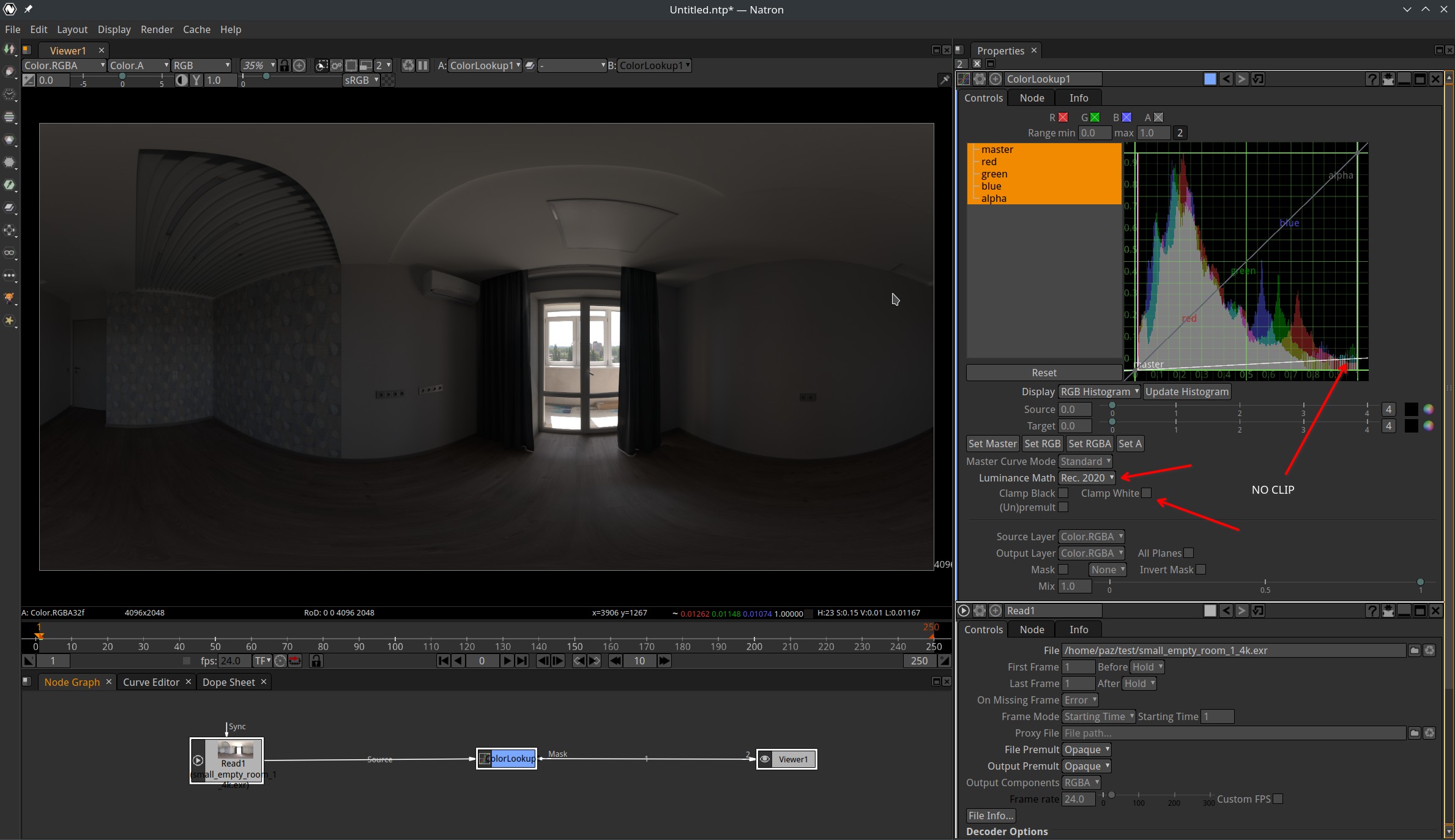
After setting them both Natron and Krita work in 32fp.
сб, 11 нояб. 2023 г., 02:06 Andrea paz <gamberucci.andrea@gmail.com>:
After setting them both Natron and Krita work in 32fp.
well, what is interesting that Natron's histogram DISPLAY probably normalizes both axis (I see numbers go from 0.1 to 0.9 and then some), but yeah, there is option for not clipping ..... Krita's display does not show grid/axis marks so it harder to say how it works .... I guess to 100% at least in this config
participants (2)
-
 Andrea paz
 -
 Andrew Randrianasulu